Put the plot where the description says it is.
A plotted boundary starts with no position on the earth. Move it onto the map by street address, by latitude and longitude, or by the Public Land Survey System reference the description already carries: township, range, section, then the quarter.
From a floating plot to a located boundary
The chain is short: select the plot, drill the reference, place it.
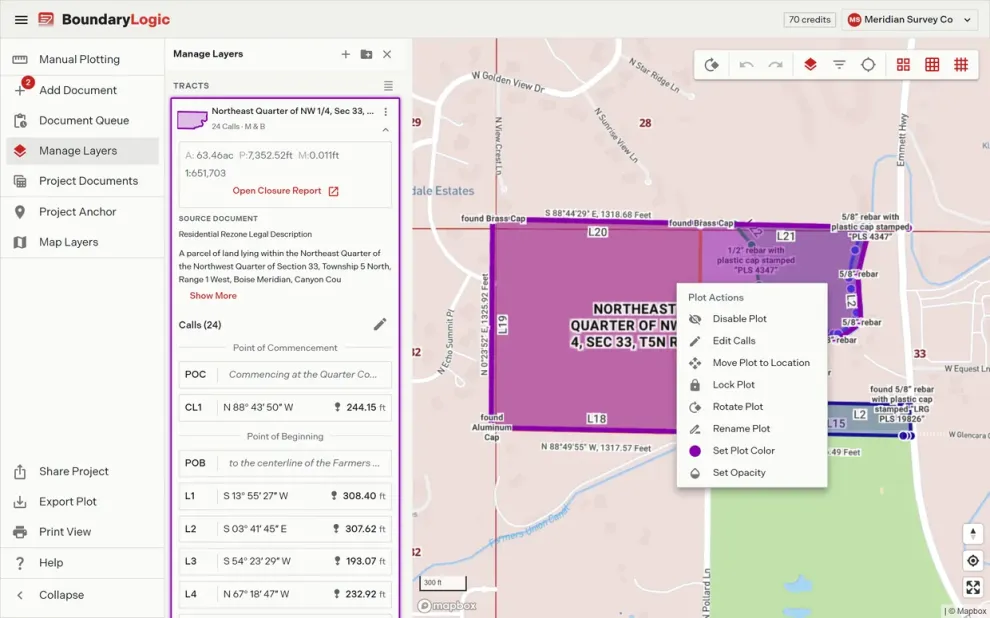
Open the plot's actions
Right-click the plot on the map. Plot Actions carries Move Plot to Location, alongside the rest of that layer's controls: visibility, edit calls, lock, rotate, rename, color, and opacity.
Drill the PLSS reference
Pick the state, then type the township and range. The 36 sections draw in survey order, 6 through 1 across the top and 31 through 36 along the bottom. Click the section, drill into a quarter, and choose 1 of 9 targets: 8 corners or the center.
The boundary lands on the map
Move Plot regenerates the drawing at the new position and flies the map to it, with the township and section grids switched on, so the tract sits against the reference it was placed from.
What a locate places, and from what
- A street address
- Latitude and longitude
- Township, range, and section
- A quarter or quarter quarter
- The 36 sections in survey order
- 9 placement targets per section
- Township validation as you type
- PLSS grids on the basemap
- PLSS placement is on Professional and above
- Accuracy decreases for quarter and quarter quarter sections
- Nothing moves until you choose Move Plot
Locates, answered
What does it mean to locate a plot?
Plotting draws the traverse from its calls. Locating gives that drawing a position on the earth, so it lines up with the basemap, the PLSS grid, and everything else in the project.
Do I need coordinates?
No. A township, range, and section is enough, and most descriptions already carry one. Address and latitude and longitude are there for when you have those instead.
What if the section is irregular?
Trace says so and stops the drill into quarters, because the aliquot subdivision of an irregular section is not a safe assumption to make on your behalf. Place at a section corner instead.
Can I move a plot after it is placed?
Yes. Open Plot Actions again and choose a different reference. The drawing regenerates at the new position each time.
Which plans include PLSS placement?
Professional, Expert, and Enterprise. The PLSS tab carries a Beta chip.
Put a boundary on the map.
Manual plotting is free to start. PLSS placement is on Professional and above.